Tax ID
Bill to
Tax ID
| # | Item and description | Qty | Price | Tax | Amount | Options |
|---|---|---|---|---|---|---|
| 1 | 0.00 | |||||
| 2 | 0.00 |
Payment details
Subtotal
Less discount
Total
Amount due
Free, with no sign up
A free invoice maker that works online in your browser. Click any part of the invoice, type, then download or email the PDF.
Set up for your countryChange
| # | Item and description | Qty | Price | Tax | Amount | Options |
|---|---|---|---|---|---|---|
| 1 | 0.00 | |||||
| 2 | 0.00 |
 ClassicA serif title and calm rules. Suits studios and consultants.
 BandYour colour across the top. Works with a simple logo.
 MinimalThe amount due comes first, in large type.
 StatementThe total sits in a block of your colour.
 LedgerA spreadsheet grid for parts and long lists.
 CenteredCentred and formal, for professional services.
 BoldA large title and a dark total bar.
 CompactFits the most lines on a page.
Private by default
The editor, the sums and the PDF are all made in your browser. We never see your customers, your prices or your bank details. If you press Email me, the PDF goes to WhizInvoice only to deliver that email.
How we handle data
Every invoice downloads as a real PDF made in your browser, the same file you would get from paid invoicing software.


An invoice is a dated request for payment with a unique number. It names you and your customer, lists what you supplied, adds any tax, and shows the amount due and how to pay. This is ours, part by part.


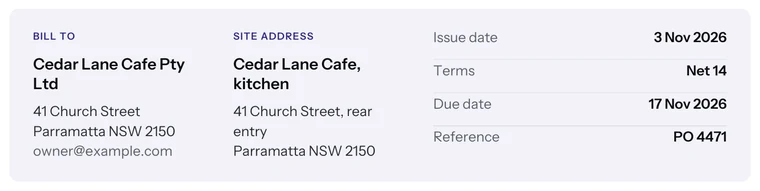
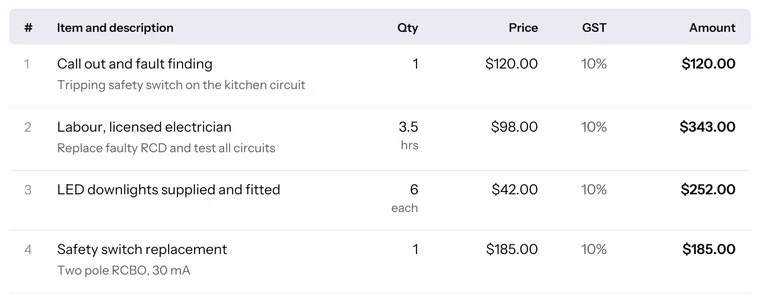

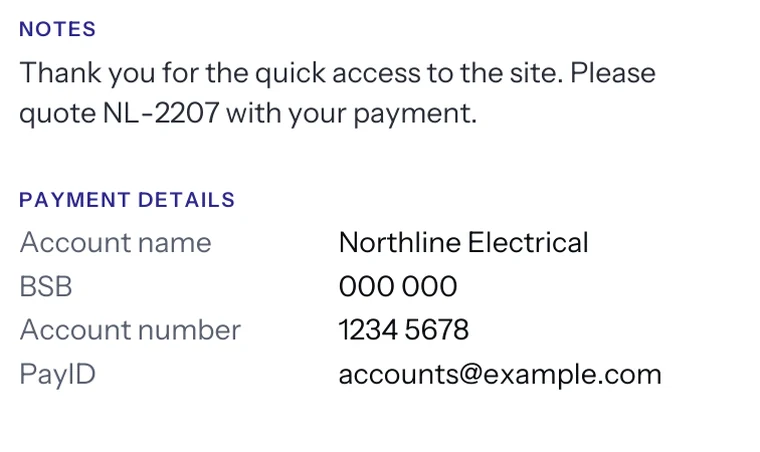

Every invoice needs your details, the customer, a unique number, the date, what you supplied and the amount due. A tax invoice adds your tax number and the tax amount. These are the rules that differ.
| Rule | Australia | New Zealand | United Kingdom | Ireland | United States | Canada | India | Singapore | South Africa | UAE |
|---|---|---|---|---|---|---|---|---|---|---|
| Standard rate | GST 10% | GST 15% | VAT 20% | VAT 23% | Set by state and city | GST 5%, or HST 13% to 15% | GST 18% (5% and 40% also) | GST 9% | VAT 15% | VAT 5% |
| Title wording | Tax invoice | Optional since 2023 | No set wording | No set wording | No set wording | No set wording | Not specified | Tax Invoice | Tax Invoice or VAT Invoice | Tax invoice |
| Your tax number | ABN | GST number, over $200 | VAT number | VAT number | Not required federally | GST/HST number, $100 and up | GSTIN | GST registration number | VAT number | TRN |
| Customer details | Name or ABN over $1,000 | Name plus one identifier over $1,000 | Name and address | Name and address | No federal rule | Name from $500 | Name, address and GSTIN if registered | Name and address | Name, address and VAT number (full invoice) | Name, address and TRN if registered |
| Simplified invoice | No separate type | Fewer details up to $1,000 | Up to £250 | Up to €100 | Not applicable | Fewer details under $500 | No value threshold | Up to S$1,000 | Abridged under R5,000 | Up to AED 10,000 |
| Time to issue | 28 days from a request | 28 days from a request | Normally 30 days | 15 days after month end | No federal rule | Not stated | 30 days for services | 30 days | 21 days | 14 days |
| Register for tax from | $75,000 turnover | $60,000 turnover | £90,000 turnover | €42,500 services, €85,000 goods | Set by each state | Over $30,000 in four quarters | Rs 20 lakh services, Rs 40 lakh goods | S$1 million | R2.3 million (compulsory) | AED 375,000 |
Checked against official tax office pages, October 2026. Amounts are in local currency. Always confirm the rule for your own sale. Read the full comparison.
InvoiceMakerHQ is a free online invoice generator. Use it as a quick invoice maker for one job, an invoice builder for long parts lists, or an invoice creator for tax invoices with GST or VAT. Every invoice is free, with no limit, and downloads as a PDF.
Short answers first. Cannot find yours? Ask us.
Yes, completely. There is no account, no trial and no watermark, and no limit on how many invoices you make. The site is paid for by WhizInvoice, our sister app, which some people move to when they want to email invoices and take card payments.
No. Every button works without an account and we never ask for your email address to give you your own invoice.
Not unless you ask us to email it. The editor, the sums and the PDF are all made in your browser, and your draft, logo and last 20 invoices are kept in this browser’s local storage. If you press Email me, the PDF and your email go to WhizInvoice, our sister company, only to deliver that email.
Choose your country, then set Tax to Added or Included. The usual rate is filled in and the title changes to the wording your tax office expects, such as Tax Invoice. You can set a different rate on any line or mark a line as exempt.
Yes. Set Tax to Included and the editor works the tax out of each price, shows it per rate, and adds a line saying the total includes it. This is common for sales to consumers in Australia, New Zealand and South Africa.
Any number works if each one is used once and they run in order. INV-0001 is a common start. After each download, the next invoice here counts up by one. Our invoice numbering guide has formats that sort well.
Yes. Click Add your logo and pick a PNG, JPG or WebP file up to 10 MB. It is resized in your browser, kept only on this device and placed on every invoice you make here until you remove it.
Real text with embedded fonts, so it prints sharply, can be searched and works in every PDF viewer. Pick A4 or US Letter before you download. The file is named with the number and customer, such as Invoice-INV-0007-Acme.pdf.
Classic and Centered suit consultants and studios. Band and Bold carry your colour and work well with a simple logo. Minimal and Statement put the amount due first, which helps busy clients pay. Ledger and Compact fit long parts lists. You can switch at any time without losing anything.
The editor makes PDF files. For a file you can edit later, use our Word invoice templates or the Excel templates, which add up totals for you.
It does the busy work for you without AI. Pick a country and the tax name, rate, title and paper size are set. Numbers count up, due dates follow your terms, and every total and tax line is worked out exactly to the cent. Nothing you type is sent to an AI service.
Yes. On a phone the invoice becomes a short form in sections, with a bar at the bottom for Preview and Download. Preview shows the finished page exactly as the PDF will look.
Yes. Press Email me, type your email, and we send the PDF to your inbox so you can keep it or forward it to your customer. The marketing box is unticked, so you only get tips if you ask for them. To send, track and get paid online, WhizInvoice does that free for unlimited invoices.