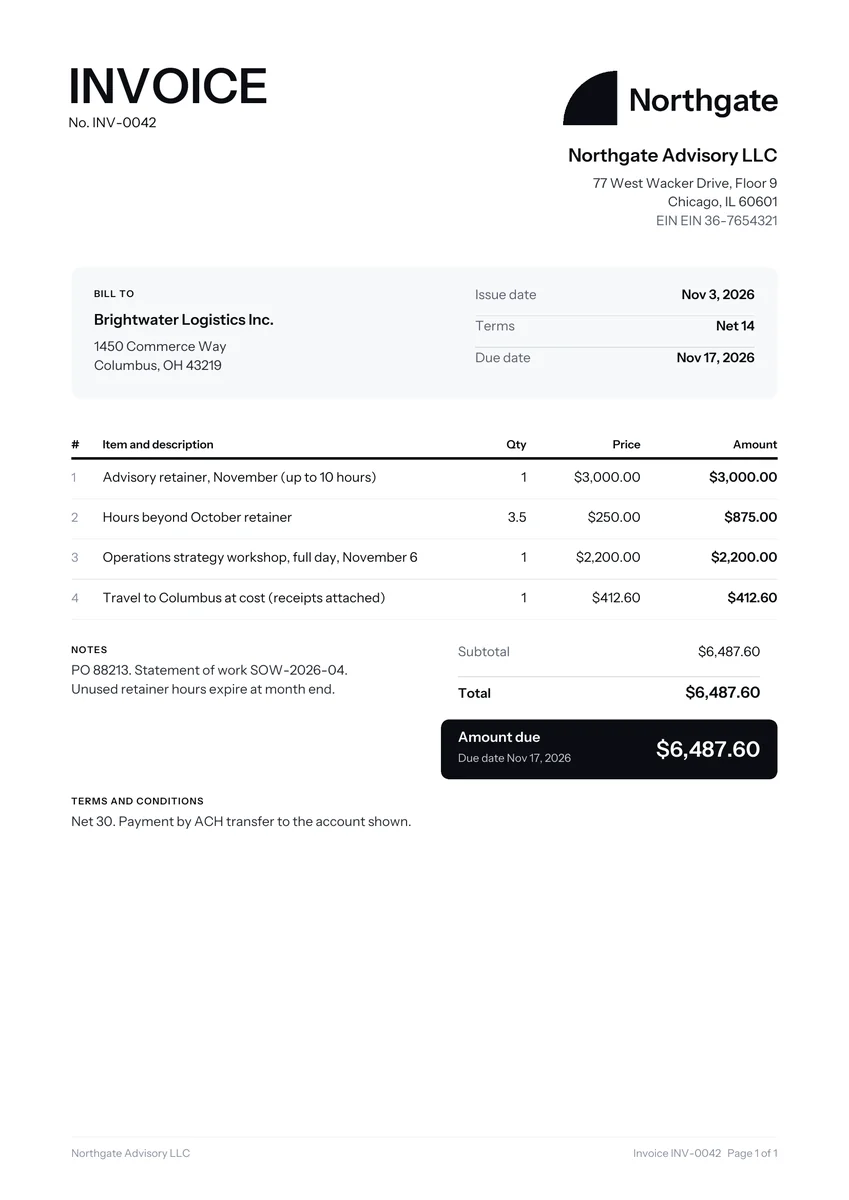
How consultants usually bill clients
Consultants tend to use one of four models: a monthly retainer for ongoing advice, a day or half day rate for workshops and site visits, an hourly rate for ad hoc calls, or a fixed fee for a defined project. Many combine them, for example a retainer with extra hours billed at an agreed rate.
- Retainer: a fixed monthly amount that buys access, a block of hours, or both. It is often invoiced at the start of the month.
- Day rate: a set price for a working day on site or in workshops. State how many hours a day means, such as 8 hours including travel within the city.
- Project fee: one price for a defined output, such as a market review, often split into stages.
- Expenses: travel, accommodation and venue costs, usually passed on at cost with receipts, if your agreement allows it.
Consulting invoice template line items and example prices
These are line items consultants commonly use, with example prices for illustration only. Rates for advisory work vary widely by sector, seniority and region, so take the table as a guide to wording and structure. Notice how each line says what was delivered and how it was priced.
| Line item | How it is usually charged | Example price |
|---|---|---|
| Monthly advisory retainer, up to 10 hours | Fixed monthly, billed in advance | $3,000 (example) |
| Hours beyond the retainer | Hourly, billed in arrears | $250 per hour (example) |
| Strategy workshop, full day | Day rate | $2,200 (example) |
| Site visit, half day | Half day rate | $1,200 (example) |
| Discovery interviews and findings report | Fixed project fee | $6,500 (example) |
| Flights and hotel for client visit | At cost, receipts attached | $640 (example) |
What a consultant invoice should show
Larger clients run invoices through accounts payable, where someone who never met you checks them against a contract. Many consultants include the engagement or statement of work reference, the client’s purchase order number, the period covered, and the name of the person who approved the work, so the invoice can be matched quickly.
- Period covered: for example, “Retainer for November” or “Workshop on November 6”.
- Hours summary: a short log of dates and hours for any time billed beyond the retainer.
- Expense detail: one line per expense type, with receipts attached as a separate file.
- Rollover rule: whether unused retainer hours carry over or expire.
- Terms: net 15 or net 30, matching your contract. Our guide to payment terms on invoices explains the options.
Invoicing a retainer every month
A retainer invoice works best when it goes out on the same day each month, with the same wording and a fresh invoice number. Bill the fixed amount in advance, then add any extra hours from the previous month as separate lines, so the client always knows which part is fixed and which part changed.
If the retainer runs for a year, a recurring setup saves time. Our guide to recurring invoices covers the basics, and WhizInvoice can schedule repeat invoices if you want that handled for you.
Mistakes that slow down consulting payments
Consulting invoices rarely get disputed for the rate. They get delayed because the paperwork does not match what the client’s finance team expects. These are the problems that come up again and again, and each one is easy to fix before you press send.
- No purchase order number. Many companies cannot pay an invoice without one, so ask for it at kickoff.
- “Consulting services” as the only line. Name the work and the period.
- Expenses with no receipts or with a markup the contract does not allow.
- Scope creep left unbilled. Extra workshops or reports that were requested by email should be on the invoice, with the date of the request.
- An undefined day. If a day ran to 11 hours, the client needs to know in advance whether that is one day or more.
Using the template and our free generator
Download the consulting template here as a Word, Excel or PDF file, or load our sample consultant invoice in the generator. The sample shows a monthly retainer, extra hours, a workshop day and travel at cost. Edit any line, add your logo and download a PDF.
The Ledger and Statement designs suit firms that want a formal look. For other trades and blank layouts, see our full set of invoice templates. Consultants who also offer technical work may prefer the IT support invoice, and solo advisers often start with the freelance invoice layout.
Fill it in on screen and download or email a real PDF. No sign up.