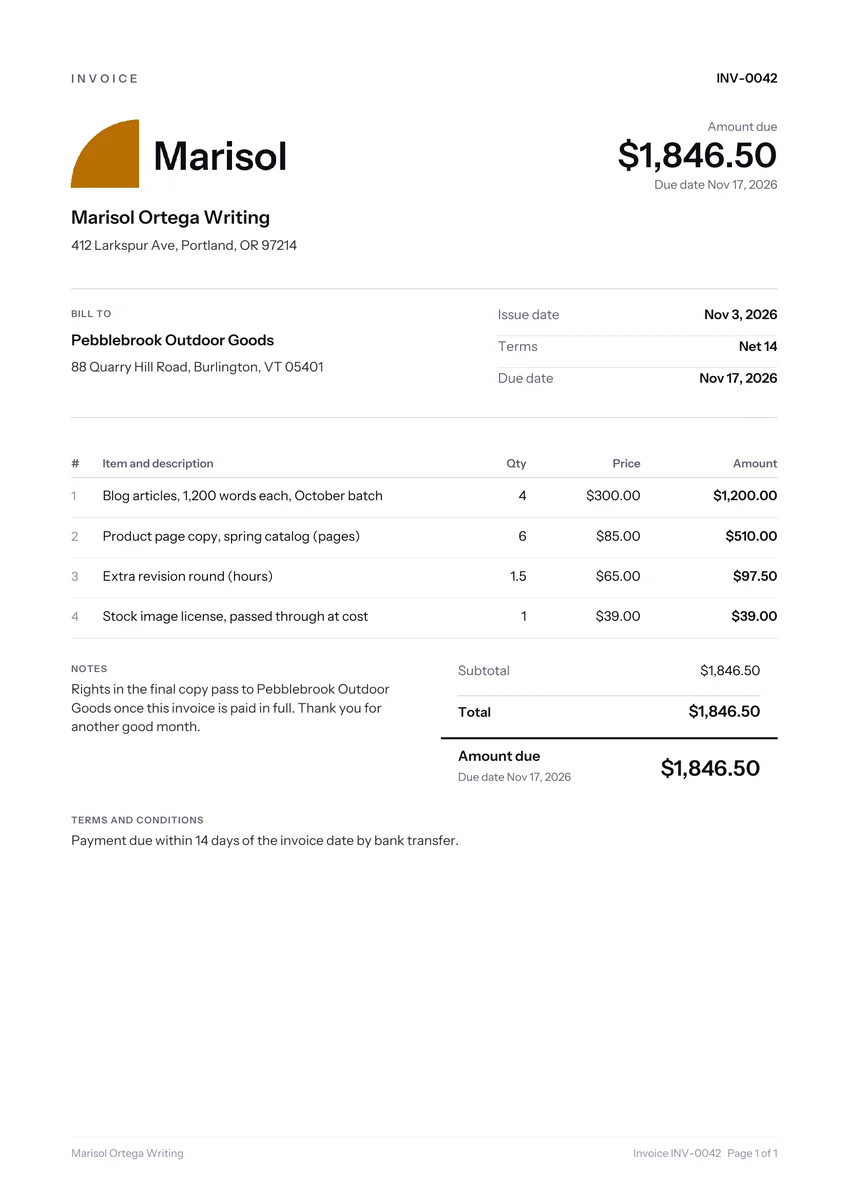
How freelancers usually bill clients
Freelancers usually bill in one of four ways: a fixed project fee, an hourly rate, a day rate or a monthly retainer. Plenty of people mix them, such as a fixed fee for the agreed scope plus hourly billing for extras. Use the method you agreed before starting, and make the invoice mirror it.
- Project fee: one price for a defined deliverable, often split into deposit and final payment.
- Hourly: tracked time in set blocks, with hours and rate shown.
- Day rate: common for embedded work, such as a week inside a client’s marketing team.
- Retainer: a fixed monthly amount for an hour allowance, billed at the start of the month.
Example line items on a freelance invoice template
Strong freelance line items name the deliverable, not just the activity. “Website copy” is vague. “Home page and About page copy, final versions delivered Oct 14” tells the client exactly what they are paying for. The prices below are examples only, showing how each kind of item is commonly charged.
| Line item | How it is usually charged | Example price |
|---|---|---|
| Blog article, 1,200 words | Per piece | $300 each |
| Logo concept round | Fixed fee per round | $450 |
| Extra revision round | Hourly | $65 per hour |
| Monthly retainer, up to 10 hours | Monthly, in advance | $750 |
| Rush delivery, under 48 hours | Surcharge on the item | 25% of item price |
| Stock image license for the client | Cost passed through | $39 |
Keep the receipt for any cost you pass through.
What to put on a freelance invoice
Beyond names, the invoice number, dates and the total, a freelance invoice works best with the client’s purchase order or project code, a clear due date and your payment details. Bigger clients pass invoices to an accounts team that has never heard of you, so the document has to explain itself.
- The PO number and the name of the person who approved the work.
- The service period, such as “Work completed Oct 1 to Oct 31”.
- A rights note if your contract transfers usage rights on full payment.
- Your GST or VAT number and the tax on its own line, if you are registered.
Based outside the US? See our UK invoice rules or the Canadian GST/HST invoice page.
Retainers, deposits and partial payments
For a large project, a deposit invoice before kickoff and a final invoice on delivery give both sides a clear schedule. Reference the deposit invoice number on the final one. On a $3,000 example project, invoice 1041 bills a $1,500 deposit, and invoice 1047 shows the $3,000 fee, less $1,500 paid on 1041, leaving $1,500 due.
Retainers work the other way round: invoice at the start of the month and say what happens to unused hours. Our guide to deposit invoices covers the wording for both.
Freelance invoicing mistakes that delay payment
Freelance invoices tend to stall for small, fixable reasons that have nothing to do with the quality of your work. Each of these can push a payment back by weeks, so check for them before you send anything to a new client.
- Sending it to your contact only. Ask on day one who in accounts receives invoices.
- Writing “net 30” with no date. Add the actual date, such as “Due Nov 28”.
- Absorbing scope creep. An unplanned fourth revision round belongs on its own line.
- Rounding hours silently. If you bill in 15 minute blocks, say so in your terms.
- Waiting for month end. Invoice on delivery, because the payment clock starts then.
Our explainer on invoice payment terms compares net 15, net 30 and due on receipt.
Using the template and the free generator
Download this freelance layout as a Word document, an Excel spreadsheet or a PDF from this page, or fill it in online. Our invoice generator with a sample freelance project opens with an example writing job already entered, so you edit text instead of starting from nothing.
Add your logo, change the client and lines, then download a PDF. Drafts stay in your browser. Fixed contract work may suit the contractor invoice layout, and a studio selling several services the small business version. Browse the invoice template library or read how to invoice as a freelancer.
Fill it in on screen and download or email a real PDF. No sign up.